Background
When I first joined Google, I had just spent a considerable amount of time playing around with Notion, and I was a fan. The rich representations of not only textual elements such as headers and emphasis, but also of elements such as lists, web bookmarks (which rendered as a quasi-preview), and the ability to embed media right within my notes had sold me on the product. I still used nvAlt as a daily driver, but when it came to building a notebook on a topic (such as tech interview prep), Notion became my go-to.
However, after I joined Google, I was forced to scramble for an alternative. 😰 This is because Google has fairly strict policies around where one can and cannot put corporate data. Notion, being a third party tool that hosted data exclusively in the cloud, was a big no-no. Thus, I switched to Foam on VSCode, and haven’t looked back since (for the most part…Notion still has nicer bookmark previews)!
Overview
Foam provides everything one might need to set up a digital Zettelkasten, including the wonderful (if rarely used) graph view. As soon as I started using it, however, I began to miss the rich representation Notion had allowed for — so I went and found myself a WYSIWYG markdown editor for VSCode, and set things up to make that the default. Unfortunately, that didn’t support rendering wikilinks, and due to the heavy amount of interlinking of notes I was planning for, that was unacceptable. So, I made my own version of the extension, that supports wikilinks, has better colors (in my opinion), and has an updated version of echarts.
These are the reasons I now prefer Foam on VSCode over Notion, as well as over nvAlt:
- I can take my notes in markdown, which is a very portable format
- The daily note shortcut has helped my journal each day, which has been valuable
- Markdown supports checkboxes and TODOs, so I might replace Omnifocus with this one day as well
- My notes are WYSIWYG if I need them to be, and support rich media including embedded content and charts (which, thanks to tools such as
echarts,mermaid,graphviz, and others, means that I can create visualizations on the fly as I would in a regular notebook) - I can link between my notes, as well as examine and navigate these links by simply following them, or using backlink exploration and graphs
- Searching through my notes is very easy, and they’re all in one place
- I can tag my notes, and do some pretty cool things with these tags (such as generating this very website!)
- My notes are synced with the cloud and across different computers using Google Drive for Desktop
- My attachments, such as screenshots and files, are adjacent to my notes and synced alongside them
Setup
Extensions
The extensions that I use are:
- Foam (link to my version, supports backlinks in WYSIWYG mode) (essential for the Zettelkasten basics)
- If you use my version, install with
code --install-extension foam-vscode-0.20.2.vsix
- If you use my version, install with
- Markdown All in One (keyboard shortcuts and other niceties when not in WYSIWYG view)
- Markdown Editor (link to my version) (I find this essential, but you might be alright without it)
- Paste Image (allows pasting images to notes using a shortcut, automatically saving to attachments)
- Copy Filename (very useful for quickly grabbing filenames for a wikilink style link)
- Email (.eml syntax highlighter, useful for saving and then refferring to emails)
- file-alias (allows RegEx matched content to substitute for filenames, which helps a lot when your filenames are just timestamps)
- Word Count (optional)
- vscode-pdf (optional)
Configuration
This is the configuration I use for VSCode:
{
    "markdown-linkify.rules": [
        { "prefix": "go/" },
        { "prefix": "cl/" },
        { "prefix": "cr/" },
        { "prefix": "cs/" },
        { "prefix": "b/" },
        { "prefix": "t/" },
        { "prefix": "google3/" },
        { "prefix": "who/" }
    ],
    "file-alias.contentMatch": "(title: |# )(.*)",
    "file-alias.contentMatchFormat": "{2}",
    "workbench.editor.wrapTabs": true,
    "window.title": "Novel Home",
    "workbench.colorTheme": "Default Light+",
    "files.autoSave": "afterDelay",
    "pasteImage.path": "${currentFileDir}/attachments",
    "foam.completion.label": "title",
    "foam.completion.useAlias": "whenPathDiffersFromTitle",
    "search.sortOrder": "modified"
}
Philosophy & Shortcuts
Alfred Workflows
There are several different philosophies one could choose from when deciding on Zettelkasten identifiers. Personally, I prefer using a timestamp as a filename, which I use a shortcut to generate when I’m creating a note. This frees me from thinking too hard about filenames, and also gives me valuable info about when a note was created, without much extra effort.
# Generate a title and print it -- this is tied to a shortcut
echo -n $(date '+%Y%m%d%H%M%S.md')
The drawback, of course, is that I can’t search my notes by title as easily (a full text search won’t be limited to my markdown titles) — but I’ve made an Alfred workflow to help me find my notes by title, regardless of the actual filename.
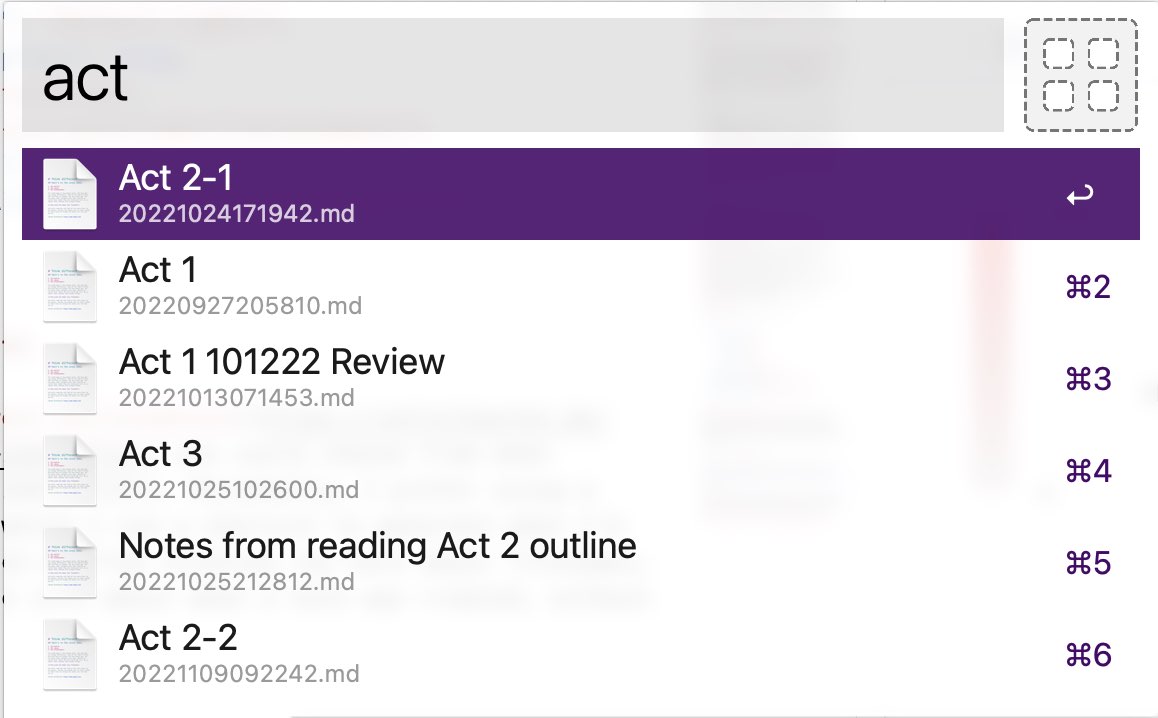
My title search Alfred Workflow in actionThe code used in this workflow looks like this:
#!/bin/bash
# Tool to search notes by Markdown title
query=$1
log() {
	echo "$@" >/dev/stderr
}

# Prepare some json stuff
start='
{"items": [
'

end='
]}
'

json=''

cd "$FOAM_DIR"

IFS=$'\n' read -r -d '' -a results < <( ack --nofilter -im1o "((?<=^title: ).*$query.*$)|((?<=^# ).*$query.*$)" *.md && printf '\0' )

for ((i = 0; i < ${#results[@]}; i++))
do
    resultArr=($(echo ${results[$i]} | tr ":" "\n"))
    currJson="
    {
        \"uid\": \"${resultArr[0]}\",
        \"type\": \"file\",
        \"title\": \"${resultArr[@]:2}\",
        \"subtitle\": \"${resultArr[0]}\",
        \"arg\": \"$FOAM_DIR/${resultArr[0]}\",
        \"icon\": {
            \"type\": \"fileicon\",
            \"path\": \"$FOAM_DIR/${resultArr[0]}\"
        }
    },
    "
    json="$json$currJson"
done

echo "$start$json$end"
My Alfred Workflow can be downloaded here.
VSCode Shortcuts
In addition to the workflows above, I also have shortcuts tied to switching my editor from WYSIWYG mode to text editing mode and vice-versa. Many Foam features don’t work with the WYSIWYG — for example, backlinks only show up in the backlink explorer when in text editing mode. The text mode is also useful when graphs and media are getting in the way of editing a note. Most of my VSCode shortcuts use the super-modifier key.
I use the standard Foam shortcut for daily notes (⌥ + D on a Mac) multiple times a day in order to journal and record my thoughts.
Templates
I don’t really use templates, except when creating a new note from a link that doesn’t yet have a target note that exists. For this, I use the following template, so that I will be able to enter the note’s title in a prompt:
---
title: $FOAM_TITLE
menu: main
---
Generating Websites
I’ve created a setup to be able to generate websites from my notes — such as this one (if you’re reading this on a website). I leverage Hugo to do most of this (though I have scripts to make some substitutions such that everything actually works), and then upload the artifacts via rsync. I can easily generate multiple websites from my single Zettelkasten repo, using tags to keep them organized.
Misc. Tips
At the time of this writing, VSCode will only support audio playback in certain codecs, including MP3. This means that if you embed a video in your notes, for example, the audio won’t play unless it uses one of a tiny subset of codecs. How I get around this is by re-encoding the video using this ffmpeg command:
ffmpeg -i {$VID}.mp4 -c:v copy -c:a libmp3lame {$VID}_audio.mp4